
In one of our client engagements, a large luxury group, ServiceNow plays a central role in daily operations. It supports IT service management across multiple brands, regions, and business units, and feeds reporting on incident resolution, change management, operational risk, and service performance. As a result, data completeness and reliability are non-negotiable.
Our client relied on Airbyte automated pipelines to ingest ServiceNow data into their analytics platform, with the expectation that “successful” pipelines meant trustworthy data.
A Data Loss Incident Explained by a Hidden System Interaction
Despite stable pipelines and no reported ingestion errors, records ingested by Airbyte were less than records visible in ServiceNow. This created a serious business risk:
- Executive reporting could be based on incomplete data
- Reduced confidence in IT performance metrics
- Potential gaps in governance and audit visibility
The most concerning aspect was that the issue was silent. No alerts, failures, or obvious technical signals, just missing data.
Root Cause: A Hidden Interaction Between ServiceNow Security and Airbyte Default Ingestion Logic
ServiceNow uses Access Control Lists (ACLs) to manage who can see which records. This is essential in large organizations where data access must be tightly governed. In practice, ACLs act like row-level security: they allow a user to see some records while silently filtering out others based on roles, conditions, or ownership.
However, this security model can have an important side effect: records can exist in the system but be invisible to a technical account used for API access without any explicit indication that filtering occurred in the response returned by API. The total count returned in headers can be misleading, because it may include records the user cannot access due to ACLs.
At the same time, the ingestion tool Airbyte relied on a standard offset-based pagination strategy, which assumes that: when fewer records than the fixed page size are returned, there is no more data to fetch.
How Pagination Usually Works
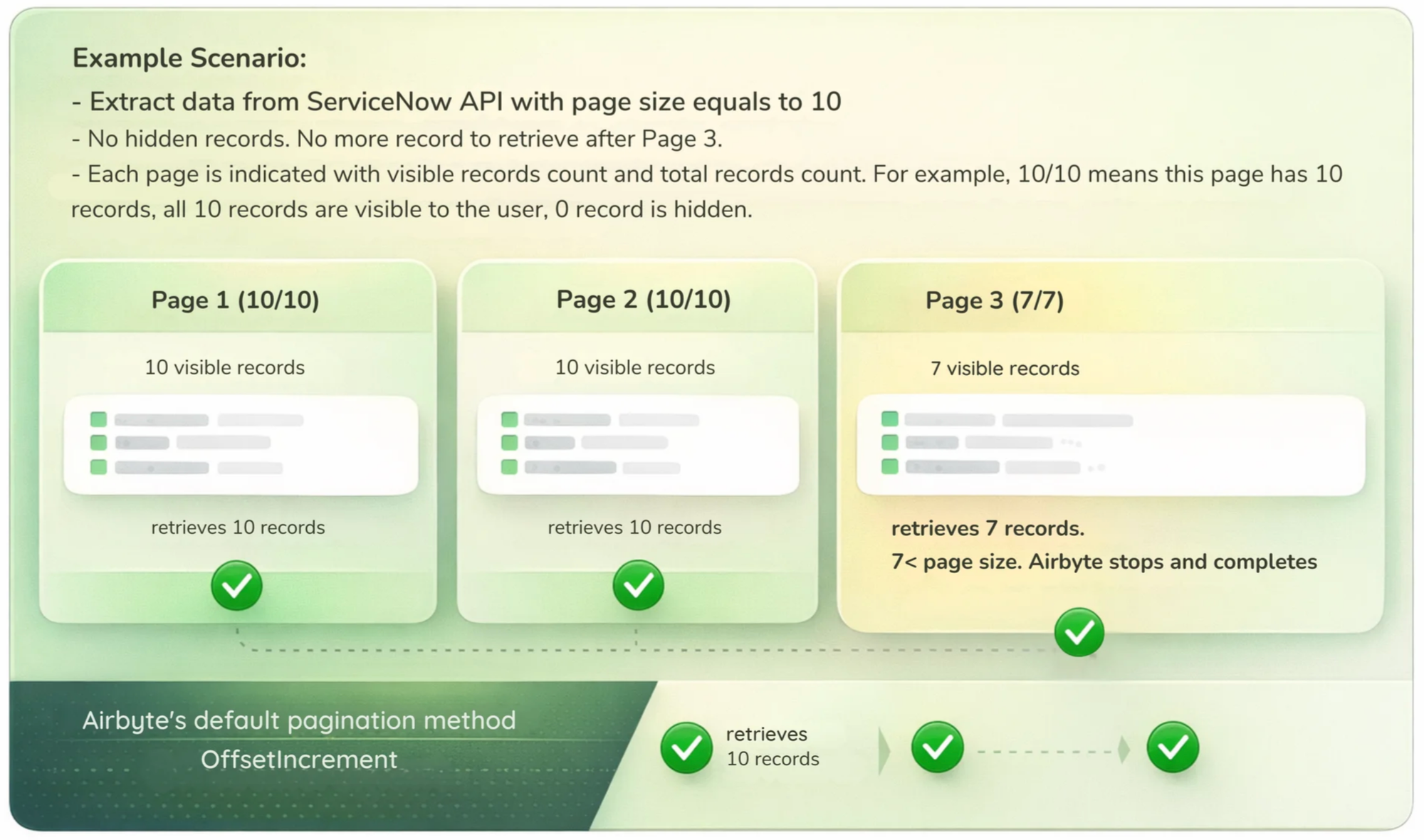
This assumption holds true for many APIs, but not in environments where records may be hidden dynamically.
What Happens with ServiceNow that has Access Control
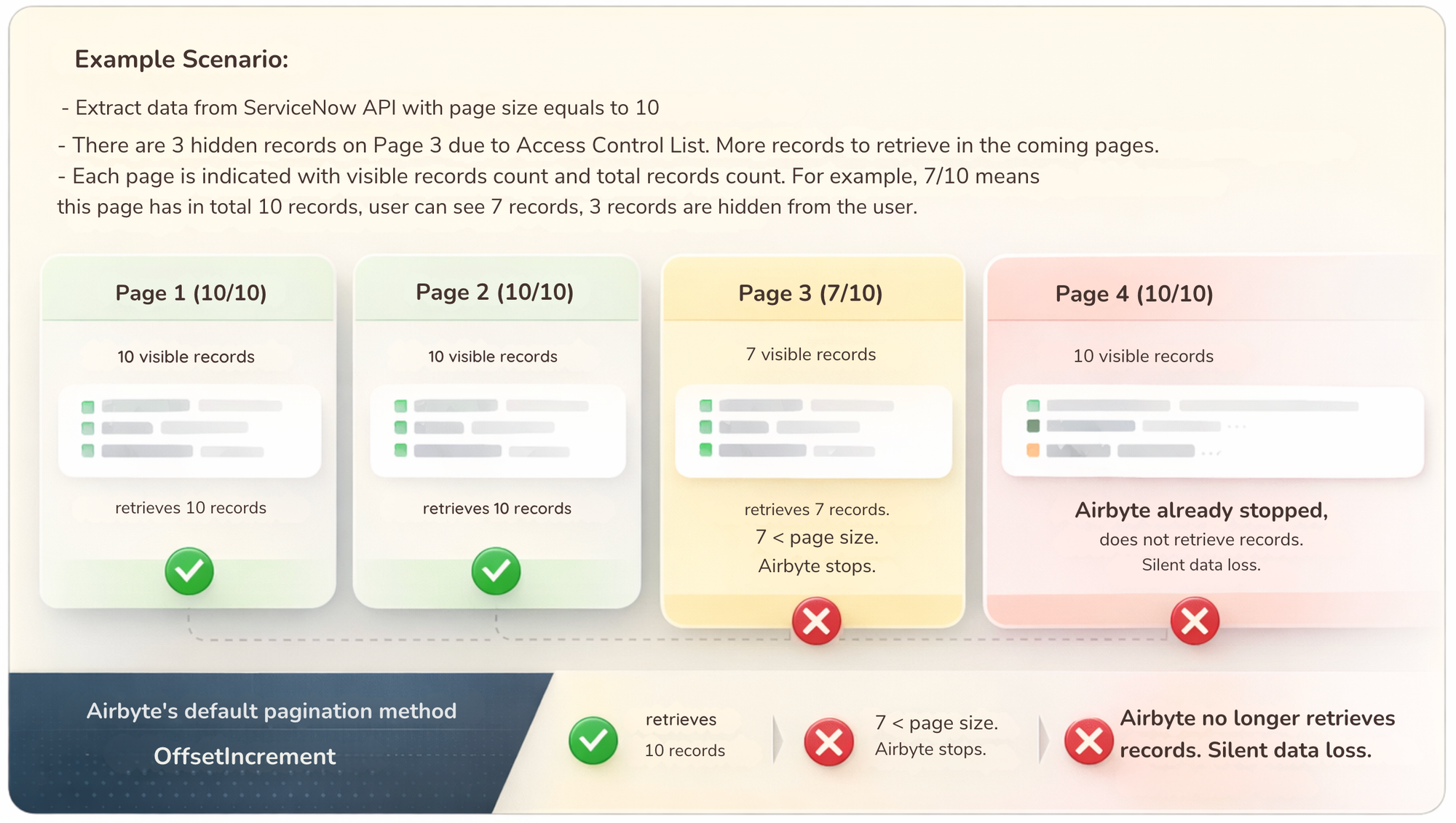
In the example scenario illustrated in the above image, Page 3 returns only 7 records even though the page size is 10, because 3 records are hidden by ACLs.
The reason for this behavior lies in ServiceNow's execution order. When an API request is made with a specific limit (e.g., 10 records), ServiceNow first identifies that 'window' of records in the database. Only after the records are selected does the system apply ACL security filters.
If the technical account used for API access lacks permission for 3 records in that window, ServiceNow simply excludes them from the response rather than fetching the next available records to fill the page.
This results in a 'short page' (7 records instead of 10), which Airbyte's default pagination misinterprets as the end of the data stream. It stops too early even though additional visible records exist on subsequent pages. The result is silent data loss.
A Pagination Strategy to Prevent Data Loss
To address this issue, there should be a custom, fail-safe pagination approach.
Instead of stopping data extraction as soon as an empty or partial page is returned, the pipeline:
- Continues paginating past temporary gaps
- Stops only after several consecutive empty pages
This makes the ingestion process resilient to ACL-related filtering, without changing ServiceNow security rules or adding operational complexity.
Simplified View of the Solution
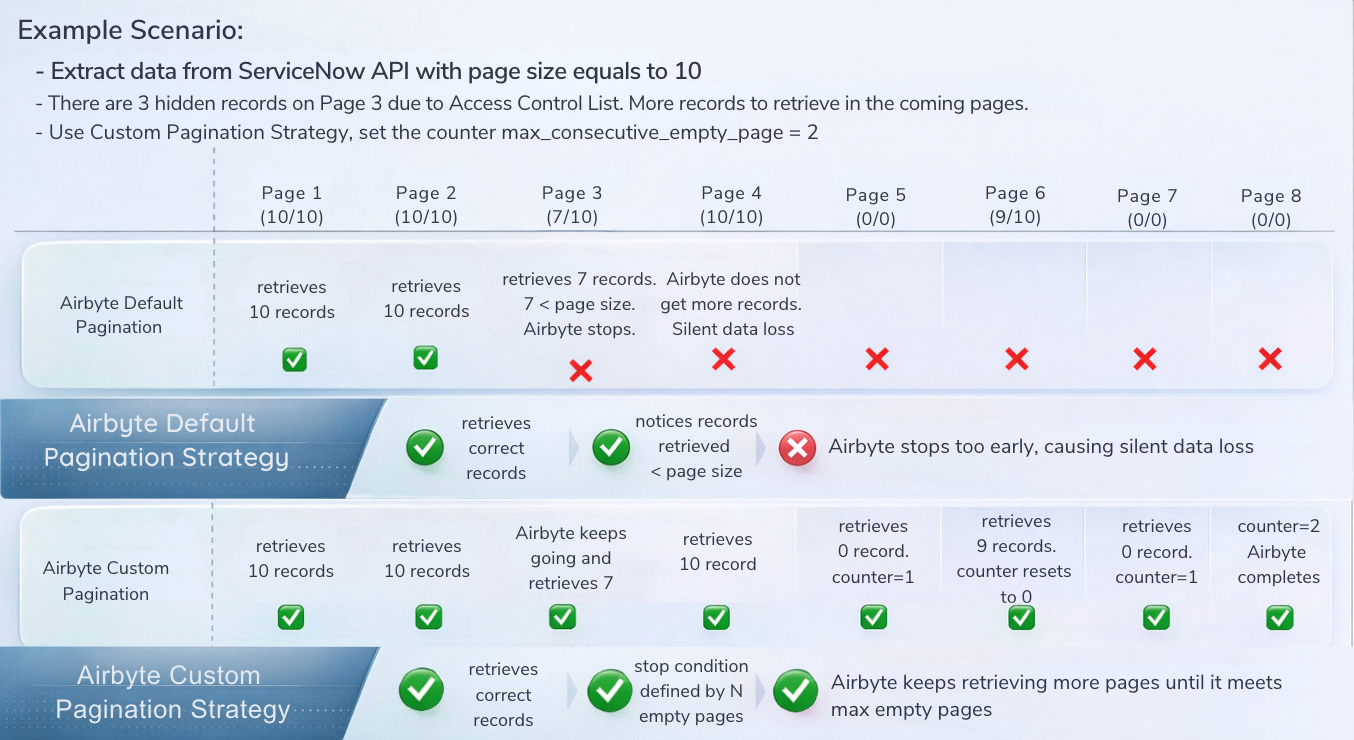
The result is a more defensive and reliable ingestion pattern that ensures all visible records are captured.
Implementation in Airbyte
The solution requires enabling Airbyte custom components and adding a paginator class that extends the standard offset increment strategy. The key change is to keep paginating through gaps and stop only after N consecutive empty pages that are defined by the user, while still advancing the offset by the requested page size.
How to choose N? In practice it depends on how dense the hidden records are and how expensive extra requests are. A good rule of thumb is to set N to cover a reasonable “gap window” (for example, a few pages beyond the largest gap you have observed), then validate by sampling:
- Compare record counts between the API and the source UI or metadata if you have access, and increase N until the gap rate stabilizes.
- In high‑churn tables, start with a higher N and tighten it once you’ve measured typical gap lengths. The goal is to make N large enough to avoid premature stop without creating excessive empty-page requests.
Below is the implemented pseudocode:
initialize empty_pages = 0
generate next offset on each response:
visible_count = count(extracted_records)
if visible_count == 0:
empty_pages += 1
else:
empty_pages = 0
if empty_pages >= N:
stop pagination
next_offset = last_offset + page_size
continue
Trade-offs and Cost Considerations
This fail-safe approach does increase the number of API calls, because it intentionally paginates past gaps. The impact is usually modest if N is tuned. The main trade-off is between completeness and extra requests.
Cost-wise, it depends on how the source API is priced:
- If the API is billed per request or has tight rate limits, the added calls can increase cost or require throttling.
- If pricing is based on data volume rather than request count, the cost impact is typically minimal.
In the use case of our client, it is for Airbyte ingestion of ServiceNow API into Google Cloud Storage (GCS) specifically.
- ServiceNow is typically licensed by instance or users, not per API call, so more calls mainly affect rate limits, throttling, and job runtime.
- GCS storage cost is driven by data volume, not the number of source API calls. There would not be a material increase in GCS storage cost. The practical risk is more about API rate limits than storage fees.
Applying the Solution to Other Mission-Critical APIs
Although this strategy was implemented to address ServiceNow ACL behavior, the pattern applies to a narrow but important class of APIs.
Something to pay attention: to keep pagination deterministic when new data arrives mid-run, add a stable filter (e.g., timestamp plus primary key) and sort by the same fields so the ordering is fixed across requests.
This approach makes sense when:
- Offset-based pagination is used (offset + limit, skip + take). Some API has the possibility to cut data to ingest into smaller pieces based on timestamp fields. However, when data volume is huge, pagination using fixed page size is still required to prevent API timeout.
- Records may be silently hidden due to ACLs, policies, or row-level security. In addition, technical or organizational constraints prevent having detailed metrics in the source to compare with the destination to ensure completeness QA.
- Empty or partial pages do not guarantee end-of-data.
Therefore there are other APIs where this pattern can apply. For example, enterprise ITSM and governance platforms, some SAP APIs with role-based filtering, systems using soft deletes or policy-based suppression without explicit signals.
Reliable Data with Direct Business Impact
This solution has immediate and measurable benefits:
- Complete and reliable ServiceNow datasets for analytics
- Restored confidence in executive dashboards and KPIs
- Reduced operational and governance risk
- Stronger auditability across IT processes
More broadly, this engagement highlights a challenge many organizations face: silent data loss can undermine decision-making before it is detected.
The custom pagination strategy described here strengthens data pipelines without adding unnecessary complexity. If used appropriately, it provides a targeted, fail-safe mechanism that preserves existing behavior, handles restricted gaps correctly and improves trust in downstream analytics.